
Worship Backing Tracks
XME Inc.Music & Audio
4.7129.00 Reviews
- Version
- 1.1.22
- Installs
- 100.00K
- Age Rating
- Everyone
Screenshots

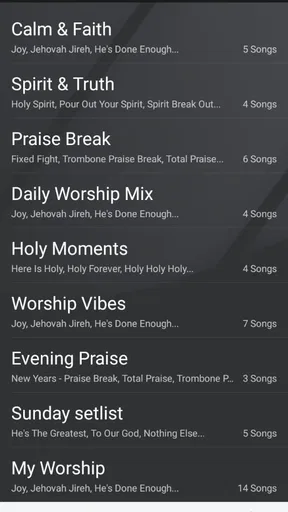
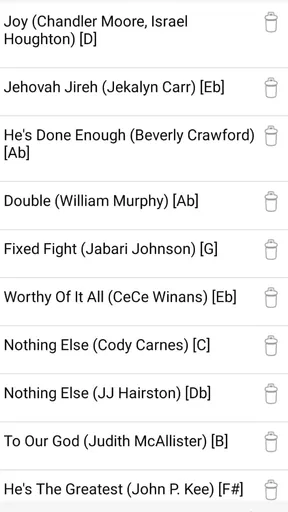
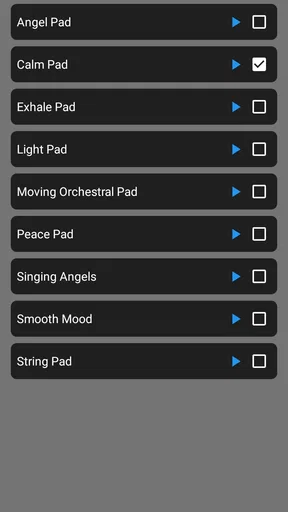
Our Review of Worship Backing Tracks
 Analysis by Appyee
Ever found yourself in a situation where you're leading worship and wish you had a full band backing you up? Well, let me tell you about an app that might just be your new best friend: Worship Backing Tracks. This little gem is like having a full orchestra in your pocket, ready to back you up at a moment’s notice. Whether you’re a solo worship leader, a small group, or even a full band looking for some additional support, this app is a game-changer.
For a first-time user, the useful question is less whether a backing track can sound full and more whether it will fit the way your group actually works. A track can support a singer who has no instrumentalist beside them, but it also asks the leader to plan timing, keys, and transitions more carefully than an informal acoustic set. I’d treat this as a rehearsal aid first, then bring it into a service once everyone knows how it will be started and stopped.
The app is in the Music & Audio category, is free to install, and is made by XME Inc. It has a 4.7 average from around 1,300 ratings, with over 100,000 installs. That gives a new user a sense that it has found an audience, but ratings alone cannot tell you whether its song selection matches your congregation. The right first check is practical: look for a song you already use, rather than choosing a new song just because a track is available.
First Impressions
When I first stumbled upon Worship Backing Tracks, I was immediately intrigued. The idea of having a comprehensive set of backing tracks for worship songs was too good to pass up. Downloading it was a breeze, and the interface is clean and intuitive. You don’t need a degree in rocket science to navigate through the app, which is always a plus in my book.
Upon opening, the app greets you with a simple yet effective dashboard. It’s easy on the eyes with clearly labeled buttons and options. You can dive right into exploring the vast library of tracks or customize your own setlist. It’s designed to get you up and running with minimal fuss.
Diving Into the Features
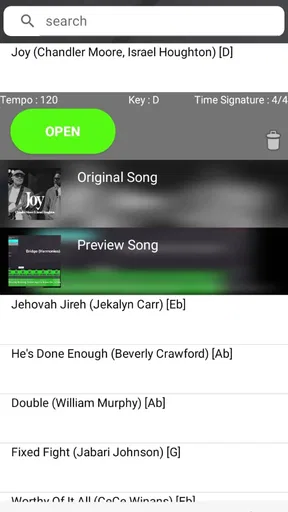
This app is packed with features that cater to both seasoned musicians and those just starting out. The library is extensive, covering a wide range of popular worship songs. Each track comes with multiple options, allowing you to adjust the key, tempo, and even the arrangement. This flexibility lets you tailor the music to your specific needs.
The app also offers a loop function, which is super handy if you want to repeat a certain section of the song. Great for practice sessions! And if you’re worried about internet connectivity, fear not. The app allows you to download tracks for offline use, making it incredibly convenient for those last-minute gigs or when you're on the road.
My suggested first run is deliberately simple: choose one familiar song, listen through before rehearsal, and test the track at the key and pace your singer can manage. Then try the loop while practicing the part that tends to cause uncertainty, such as a transition into a chorus. This creates a low-pressure first success and helps you notice whether the track’s arrangement leaves enough room for your voice or instrument.
Offline listening is especially useful when the venue’s connection is unreliable, but I would still prepare before leaving home. Download the material you plan to use while you have a dependable connection, then play it once from the device you will bring. This is not just a convenience check: it confirms that your chosen material is ready and gives you a chance to hear the whole arrangement before other people are waiting.
Customizing Your Worship Experience
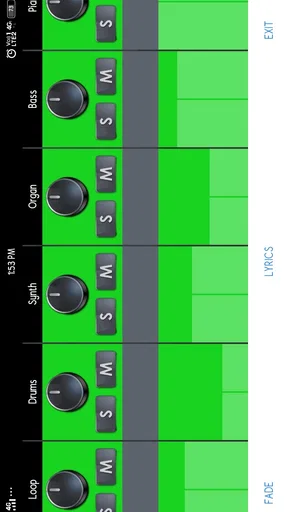
One of the standout features is the ability to create and save setlists. This means you can plan your worship set in advance and have everything ready to go. You can also adjust the mix, bringing certain instruments to the forefront or dialing them back depending on your preference. It’s akin to having a sound engineer at your fingertips.
The integration with other devices is seamless. You can connect the app to your sound system, ensuring that the backing tracks sound fantastic, whether you’re in a small room or a large venue. The sound quality is top-notch, and the transitions are smooth, making your worship experience as professional as it gets.
For a Sunday morning or a small gathering, I’d make the setlist before the day rather than searching song by song in front of the group. Put the songs in the order you expect to use them, rehearse the starts and endings, and agree on a clear cue for the leader who controls playback. The practical benefit is not only saving time; it reduces the chance that a singer begins before the track or that the team is unsure whether to repeat a section.
There is a trade-off when using prerecorded accompaniment: it can make a small team sound more complete, but it cannot respond spontaneously in the way live musicians can. A live drummer can extend a moment, and a guitarist can follow a change in the leader’s phrasing; a track generally rewards a planned structure. I’d use the app when consistency and fuller accompaniment matter most, and prefer a live or acoustic arrangement when the gathering depends on flexible, unplanned transitions.
Connecting to a sound system is worth testing in the actual room, not just at home. Keep the first trial short: play a section, check that the level sits comfortably beneath the singer, and listen from where the congregation will be. A mix that sounds balanced near the device may feel different across a room. If your group has a sound operator, let them hear the track during rehearsal so they can set levels before the service rather than making hurried adjustments during it.
A Few Things to Keep in Mind
While Worship Backing Tracks is an excellent tool, it does come with a learning curve, especially if you’re new to using tech in your worship sessions. Spending a bit of time exploring the app and testing out its features is a good idea before you use it live. Also, while the library is vast, it might not have every song you’re looking for, so checking in advance is always wise.
That library check is the main decision point for a prospective user. If your group relies on a specific repertoire, search for those songs before building a service plan around the app. If a favorite is missing, or the available arrangement does not suit your singers, a general music player or another accompaniment source may be a better fit. For a first-time user, it is safer to build around material you have confirmed than to assume every familiar worship song will be represented.
One subtle workflow tip is to treat key and tempo adjustments as rehearsal decisions, not last-second fixes. Try a comfortable key with the person who will lead, then let the rest of the group practice against that version. A small change can affect how confidently a singer reaches a high note and how naturally the congregation joins in. Likewise, a tempo that feels energetic alone may become difficult to lead once people are singing, so listen with the intended use in mind.
Another limitation is the difference between having control options and having a live musician’s judgement. Adjusting a track can help it fit your team, but it does not replace a player who can respond to a missed cue or stretch a quiet moment. If your service regularly changes direction on the fly, a flexible live ensemble is likely the better choice. If the arrangement is planned and the team wants dependable accompaniment, prerecorded tracks can be a sensible support rather than a substitute for every musical role.
The app is free to install, but it also offers in-app purchases, with listed items ranging from $9.99 to $399.99 each. I would explore the free experience and confirm that the app suits your routine before spending anything. The range makes it especially important to check what a particular purchase covers and whether it addresses a real need for your group. It is not necessary to buy into a broader setup just to find out whether the basic workflow feels right.
It is suitable for everyone by its age rating, and version 1.1.19 requires Android 6.0 or later. Those details make it easier to judge whether an Android device in your household or team can run it. The app is also available as a practical option for worship leaders who rehearse at home, small groups with limited instrumentation, and musicians who want a consistent accompaniment while learning a song. Someone who already has a responsive full band, rarely uses backing tracks, or needs a very specific song not in the library may get less value from it.
Final Thoughts
Overall, Worship Backing Tracks is a fantastic resource for anyone involved in leading worship. The ease of use, coupled with its extensive feature set, makes it a must-have for both amateur and professional musicians. It’s like having a band in your pocket, ready to play whenever and wherever you need them.
Whether you’re leading a congregation or just jamming out at home, this app provides the tools you need to elevate your worship experience. So, if you’re looking for a reliable and versatile musical companion, give Worship Backing Tracks a try. It might just become your go-to app for all things worship.
For me, the strongest everyday use is a small team preparing a familiar set without enough players to cover every part. A worship leader can rehearse alone, a singer can practice with a fuller arrangement, and a group can use the same planned accompaniment when its usual instrumentalist is unavailable. I would not expect it to make every service effortless; it works best when someone takes responsibility for selecting tracks, checking the order, and communicating cues.
If you are deciding whether to install it, start with one song you already know and one rehearsal, not a full service plan. Confirm the song is available, set a workable key and pace, test the loop if you need focused practice, and then try the audio through the setup you intend to use. That small trial answers the important questions in context: whether the app fits your repertoire, whether the arrangement supports your team, and whether you are comfortable managing playback.
That is why I see it as a useful tool rather than an automatic replacement for musicians. Its value comes from making prepared accompaniment more accessible, especially for solo leaders and smaller groups, while its limits become clear when a service depends on spontaneous musical response. If that balance matches your situation, it is worth trying; if musical flexibility or a very particular song list is essential, check those needs first and consider a live or more tailored alternative.
Verdict
Strengths of Worship Backing Tracks
- Extensive library of songs
- High-quality audio tracks
- Customizable setlists
- Easy-to-navigate interface
- Offline playback option
Limitations of Worship Backing Tracks
- Limited free version features
- Requires internet for updates
- Occasional app crashes
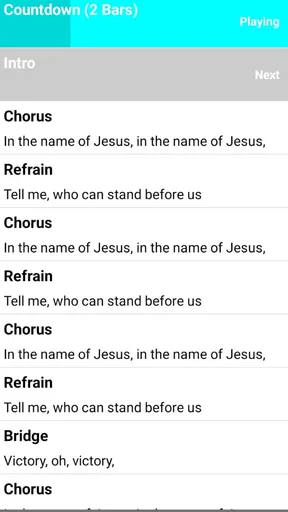
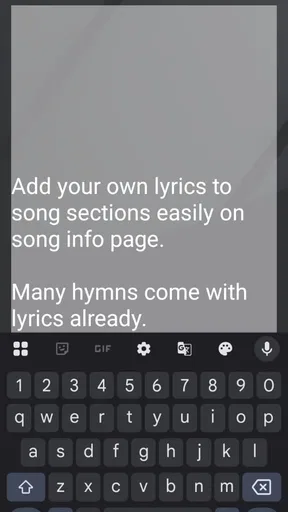
- No lyric display feature
- Subscription can be pricey
Other Releases by XME Inc.
View All
XME LOOPS
Music & Audio4.5

XME TRIGGERS
Music & Audio4.8
Similar Picks in This Category
View All
YouTube Music
Google LLC4.4

Samsung Music
Samsung Electronics Co., Ltd.3.8

Spotify: Music and Podcasts
Spotify AB4.3

JioSaavn - Music & Podcasts
Saavn Media Limited4.3

Lark Player:Music Player & MP3
Lark Player Studio - Music, MP3 & Video Player4.6

StarMaker: Sing Karaoke Songs
SKYWORK AI PTE. LTD.4.3
Frequently Asked Questions
What is Worship Backing Tracks and how does it work?
Worship Backing Tracks is a mobile app designed for musicians and worship leaders to access high-quality backing tracks for worship songs. It allows users to customize tracks by adjusting key, tempo, and instrumentals to suit their needs during live performances or practice sessions. The app provides an intuitive interface for easy navigation.
Is Worship Backing Tracks compatible with both Android and iOS devices?
Yes, Worship Backing Tracks is available for both Android and iOS platforms. Users can download the app from the Google Play Store for Android devices or the Apple App Store for iOS devices. Ensure your device meets the app’s system requirements for optimal performance.
Does Worship Backing Tracks require an internet connection?
While an internet connection is required to download tracks and updates, Worship Backing Tracks allows you to save songs for offline use. This feature is particularly useful for venues with unreliable internet access, ensuring uninterrupted playback during live performances.
What customization options are available in Worship Backing Tracks?
The app offers several customization options, including the ability to change the key and tempo of the tracks. Users can also mute or solo specific instruments, allowing them to tailor the sound to their band’s needs. These features make it versatile for different worship settings.
Are there any subscription fees or in-app purchases in Worship Backing Tracks?
Worship Backing Tracks offers a variety of subscription plans and in-app purchases. While some basic features may be available for free, access to the full library of tracks and advanced features typically requires a paid subscription. Check the app’s pricing details for more information.
